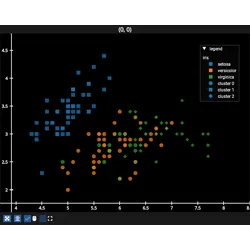
create_legend_item#
- ScatterGraphic.create_legend_item(label=None, markers_labels=None, sizes_labels=None, cmap_transform_labels=None)[source]#
Create the
ScatterLegendItemof this scatter, add it to a legend withLegend.add().The item follows the scatter: when its colors, colormap, markers, sizes or edges change the item changes with them. Per-vertex colors cannot be represented in a legend, and only a scatter with
mode="markers"is supported.A per-point
markersorsizesneeds its labels, each one adds an element per labelled value. The other features of those elements are drawn with the scatter’s uniform value, or with the value of its first point when that feature is per-point too.- Parameters:
label (str, optional) – label of the scatter in the legend, its
nameis used if not providedmarkers_labels (dict, optional) – {marker: label}, the label of each marker
sizes_labels (dict, optional) – {size: label}, the label of each point size
cmap_transform_labels (dict, optional) – {cmap_transform value: label}, the label of each value of a qualitative colormap. A quantitative colormap is shown as a colorbar instead and needs no labels.
- Return type: